
Apple Music
AppleMusic & Audio
4.554.03K Reviews
- Version
- Varies With Device
- Installs
- 100.00M
- Age Rating
- Teen
Screenshots
Our Review of Apple Music
 Analysis by Appyee
I approached Apple Music as a first-time listener, looking for a simple way to find something good to play without turning music into another chore. My first impression was that there is a lot here, but the useful part is how quickly you can make the library feel personal. It is a free app from Apple in the music and audio category, rated Teen, with a 4.6 average from around 689,000 ratings and over 100 million installs. Those figures suggest a service many people have tried, but whether it suits you depends more on how you listen than on popularity.
What to expect from the music library
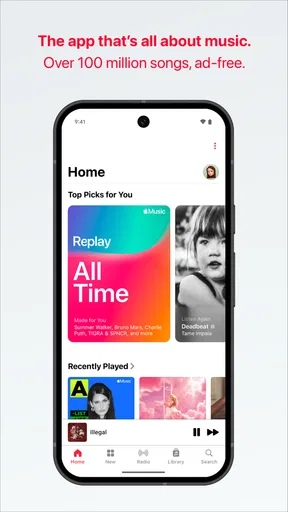
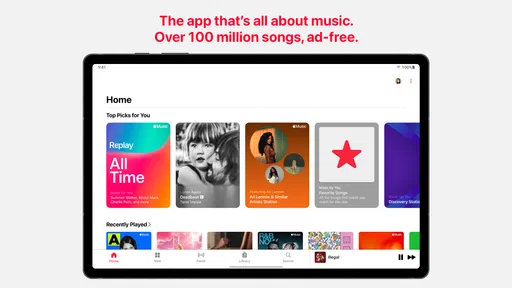
Apple Music is built around listening on demand, discovery, radio, and a personal library rather than just playing files already on your phone. Apple’s summary describes a catalog of over 100 million songs without ads. That scale is exciting, though it can also make the first screen feel like a huge shop with no obvious starting point. I found it easier to begin with artists and genres I already like, then let recommendations broaden the search instead of browsing aimlessly.
The app is free to download, while in-app purchases range from $5.99 to $199.99 per item. I would treat that as a reminder to check the plan and purchase details shown in the app before committing, rather than assuming that downloading it means every listening option is free. Apple Music is a better fit if you want a broad streaming service and are comfortable choosing a paid option for ongoing use. If you only need occasional background audio, a free radio app may be enough.
Exploring the Music Universe
Once you fire up Apple Music, you're greeted with a vast ocean of tunes. Seriously, it feels like you're in the middle of an endless record store. Whether you're into the latest pop hits or digging through classic rock archives, this app has your back.
Personalized Playlists Just for You
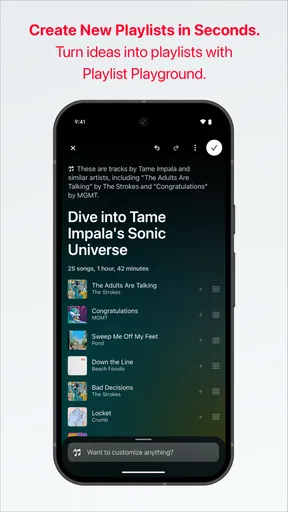
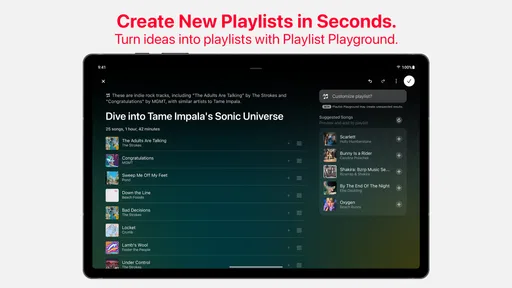
One of my favorite features is the personalized playlists. Every day, Apple Music curates mixes based on what I’ve been listening to. It's like having a personal DJ who knows exactly what you need. The "Chill Mix" is perfect for those lazy Sundays, and the "Get Up Mix" can really kickstart a sluggish morning.
For a first setup, I would make the choices that shape listening useful rather than trying to perfect everything immediately: follow artists you genuinely return to, search for a few familiar albums, and save music you want to hear again. Then use the personalized mixes as suggestions, not as a verdict on your taste. If a mix repeatedly misses, listening to and saving the artists you do enjoy gives the service a clearer picture over time. A practical tip is to keep a small range of listening in the mix; if you play only one mood for days, recommendations can become narrow when you want a change.
Radio Stations and More
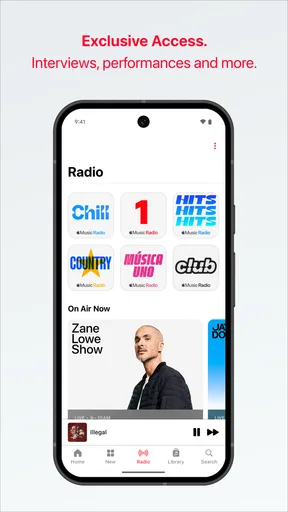
Now let's talk about the radio. Beats 1 is the flagship station, and it’s pretty cool. They have live DJs and exclusive artist interviews that keep things fresh and exciting. But if you're like me and prefer something a bit more niche, there are tons of genre-specific stations to explore. From jazz to EDM, it’s all covered.
Radio is the better choice when I want someone else to steer: it can fill a commute or a quiet room without making me choose each next track. A playlist is more deliberate, while a station makes discovery feel closer to traditional broadcast listening. I would switch between them depending on the moment rather than expecting one format to do everything. If hearing a particular album in sequence matters, search for that album; if I just want a stream of music in a style, radio takes less effort.
Offline Listening and Library Sync
For those moments when you're off the grid, Apple Music’s offline listening feature is a lifesaver. You can download your favorite tracks and listen without needing a Wi-Fi connection. Plus, if you're an Apple ecosystem fan, the library sync across devices works seamlessly. Start a playlist on your iPhone and continue on your MacBook without missing a beat.
The most reliable offline routine is to download a short playlist or a few albums before leaving home, then check that they are available on the device you plan to use. That helps on a train, during a flight, or anywhere with patchy reception, and avoids discovering too late that a favorite is not ready to play. Downloads also involve a trade-off: the more music you keep for offline use, the more device storage you devote to it. I would reserve downloads for albums I replay and playlists that suit predictable trips, rather than trying to keep the whole library on hand.
Sync is especially handy if your listening moves between devices, but I would still organize the library with care. Saving an album because I genuinely want to revisit it is more useful than adding everything that catches my eye; otherwise, finding a specific record later becomes less satisfying. If a device is not showing the library as expected, I would first check that I am using the same Apple account and that library syncing is enabled where I listen, rather than rebuilding playlists right away.
Sound Quality and User Experience
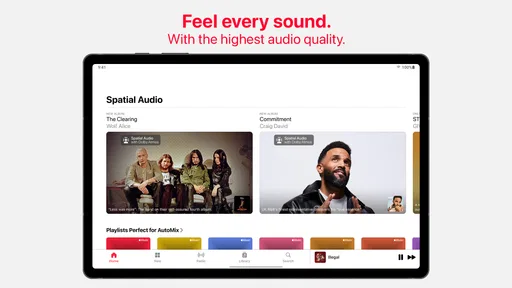
Sound quality is something I’m pretty picky about, and Apple Music doesn’t disappoint. The lossless audio quality is top-notch, making every track feel rich and vibrant. The user interface is sleek and intuitive, making it easy to navigate even if you’re a first-timer. Plus, Siri integration means you can switch tracks hands-free, which is super convenient when you’re busy cooking or working out.
For a first meaningful success, I would pick one familiar album, play it from start to finish, and save it if I want it in my library. That simple test answers several practical questions at once: whether search finds the version I want, whether the interface feels comfortable, and whether I prefer choosing exact tracks or handing control to a mix or station. A voice request can be useful when my hands are occupied, but I still prefer browsing when I am choosing among versions or deciding what to explore next.
Sound settings and everyday trade-offs
Lossless audio is appealing if you care about detail, but it is not automatically the best setting for every situation. On ordinary commutes or in a noisy kitchen, I may not notice the difference enough to make it worth prioritizing. At home, with headphones or speakers that reveal more detail, I am more likely to appreciate it. I would think about both listening equipment and data use before making sound quality the deciding factor; a better-sounding option is only useful when the setting lets you hear it.
A realistic day might start with a familiar playlist while getting ready, move to a station during errands, and end with an album saved for a quieter evening. That mix of intentional listening and hands-off discovery is where the app makes the most sense to me. It is also a helpful way to judge it during a first try: don’t just browse the catalog, see whether it fits the different moments in your actual routine.
Where it fits among music apps
Compared with a basic radio app, Apple Music gives me more control over specific songs and albums, plus a personal library and offline listening. Compared with a service whose main appeal is its recommendation feed, I would judge Apple Music by how well its mixes and radio help me discover music without losing the ability to choose exactly what plays. These are different priorities, not a universal ranking. If your first concern is free, casual listening with minimal setup, a radio-focused alternative may be simpler; if you want to build a collection around albums and artists, this app is more compelling.
It is also worth thinking about the devices you already use. Apple Music is developed by Apple, and its cross-device library experience is a natural advantage for someone who listens across Apple hardware. A person using a mix of platforms can still value the service, but should judge it on the devices they actually use rather than assuming that ecosystem convenience will matter equally to everyone. The app was released on November 10, 2015, and continues to attract a large audience, but age and reach alone do not tell me whether its layout or discovery style will click for you.
Who will enjoy it, and who may prefer another option
I would recommend giving it a try if you regularly listen to full albums, want to save favorites for later, or like alternating between recommendations and deliberate searches. It can also suit someone who wants one app for an at-home listening session, a commute, and background music while doing chores. The Teen age rating is worth noting for families choosing apps, and parents should make their own decision about what is appropriate for the listener.
I would look elsewhere if you want a service that is free for ongoing, unrestricted on-demand listening, or if you mainly want a simple stream without managing a library. The purchase range means it is sensible to review the available option and its terms before signing up. Another service may also be a better match if its recommendations, social features, or support for your particular devices matter more to you than Apple Music’s balance of catalog, library, and radio.
A calm way to decide
My advice is to start small: search for a few artists you know, save one album you love, and try a personalized mix and a station on different days. Notice whether the suggestions become more useful, whether the library stays easy to navigate, and whether offline listening solves a real problem for you. If you are unsure about cost, check the purchase details before relying on the app as your regular music source. That gives you a more grounded answer than judging it by the size of its catalog alone.
In the end, Apple Music seems to hit all the right notes for me. It’s like having an entire music universe at your fingertips. Whether you’re a casual listener or a hardcore audiophile, this app offers a robust and enjoyable music streaming experience. Just be ready to lose yourself in the tunes!
Privacy and Permissions
See what permissions an app requests and how it handles your data.
- Contacts
- read your contacts
- Location
- approximate location (network-based)
- Photos/Media/Files
- read the contents of your USB storage, modify or delete the contents of your USB storage
- Storage
- read the contents of your USB storage, modify or delete the contents of your USB storage
- Camera
- take pictures and videos
- Wi-Fi connection information
- view Wi-Fi connections
- Other
- view network connections, pair with Bluetooth devices, change network connectivity, connect and disconnect from Wi-Fi, full network access, change your audio settings, run at startup, prevent device from sleeping
How Apple Music Compares
Full ComparisonYouTube Music suits listeners who want music alongside videos, Spotify fits playlist-led discovery and podcasts, and Apple Music appeals to subscribers seeking ad-free listening and strong audio.
| App | Developer | Rating | Price |
|---|---|---|---|
 YouTube Music | Google LLC | 4.4 | Free |
 Spotify: Music and Podcasts | Spotify AB | 4.3 | Free |
 Apple MusicThis App | Apple | 4.5 | Free |
Verdict
Strengths of Apple Music
- High-quality audio streaming support.
- Extensive library with diverse genres.
- Ability to download for offline listening.
- Curated playlists tailored to user taste.
- Integration with Apple ecosystem.
Limitations of Apple Music
- Subscription required after trial period.
- Limited features without internet access.
- Occasional app crashes reported.
- Less social sharing than competitors.
- Not available on all devices.
Other Releases by Apple
View All
iTunes
Video Players & Editors4.7

Apple TV: Shows, Movies & More
Entertainment4.1

Move to iOS
Tools3.6

Apple TV: Shows, Movies & More
Entertainment4.5
Similar Picks in This Category
View All
YouTube Music
Google LLC4.4

Samsung Music
Samsung Electronics Co., Ltd.3.8

Spotify: Music and Podcasts
Spotify AB4.3

JioSaavn - Music & Podcasts
Saavn Media Limited4.3

Lark Player:Music Player & MP3
Lark Player Studio - Music, MP3 & Video Player4.6

StarMaker: Sing Karaoke Songs
SKYWORK AI PTE. LTD.4.3
You May Also Like
View All
Frequently Asked Questions
What features does Apple Music offer to enhance my listening experience?
Apple Music provides a comprehensive suite of features designed to enhance your listening experience. You can access over 75 million songs ad-free, download music for offline listening, and create personalized playlists. Additionally, the app offers curated playlists, live radio stations, and exclusive content from artists. Integration with Siri allows for voice commands, and the app supports high-quality lossless audio and spatial audio with Dolby Atmos.
Is there a free version of Apple Music available?
Apple Music does not offer a permanent free version like some other music streaming services. However, new users can take advantage of a free trial period, typically lasting three months, to explore the app's features. During this period, users have full access to Apple Music's extensive library and features without any restrictions.
How does Apple Music's family plan work, and is it cost-effective?
Apple Music offers a family plan that allows up to six family members to share a single subscription at a reduced cost. Each member gets their own individual account with personalized recommendations and playlists. The family plan is highly cost-effective, as it provides full access to all features at a lower price per person compared to individual subscriptions.
Can I use Apple Music on non-Apple devices?
Yes, Apple Music is compatible with both Android and iOS devices, and it can also be accessed on Windows PCs through iTunes. This cross-platform availability ensures that you can enjoy your music library and playlists on a variety of devices, not just those made by Apple, making it a versatile choice for users with diverse tech ecosystems.
What quality options are available for streaming and downloading music on Apple Music?
Apple Music offers various quality options to suit different listening preferences and data usage needs. Streaming and downloading can be done in standard quality, which is suitable for conserving data, or in high-quality lossless audio. Additionally, Apple Music supports spatial audio with Dolby Atmos, providing an immersive listening experience for compatible devices and headphones.
